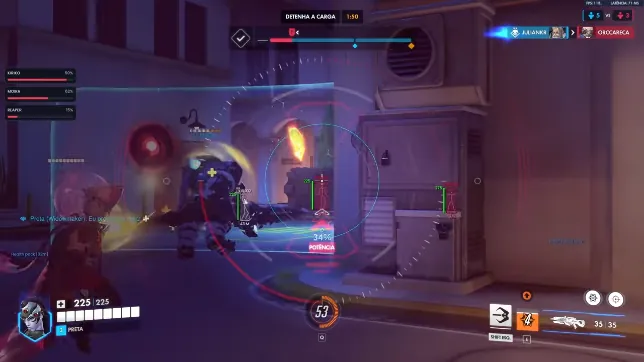
What Overwatch 2 ESP does
ESP (extra sensory perception) draws match information on top of the game. You see player positions, health cues, and ult charge even when a target is behind cover or off your screen edge.
That matters on payload, control, and push maps where one flank can delete your back line. ESP does not replace map knowledge — it gives you faster reads so rotations and peeks line up with what is actually on the field.
Everything on this page is part of Overwatch 2 Cheats. You do not buy ESP as a separate module. Open the product overview or feature list if you want the full package scope.
Visual layers and controls
Turn categories on or off so the overlay stays readable in Quick Play, Competitive, and Arcade. Use lighter settings for long sessions and add skeleton or glow only when you need extra detail.
Distance readouts, snaplines, and enemy view angle help you judge when to hold an angle versus swing. Pair boxes with the wallhack guide when you want emphasis on threats outside your FOV.
- Player info, skeleton ESP, and ult charge overlay
- 2D box, 3D box, cornered box, lines, and glow modes
- Draw FOV, target highlighting, and team or enemy colour coding
- Stream-proof rendering for capture setups
- Per-setting visual options so you can reduce clutter mid-match
Modes, maps, and maintenance
ESP works in Quick Play, Competitive, Arcade, and Custom Games on Windows 10 and 11. Toggle fewer categories in chaotic Arcade modes; add ult and hero markers when you need objective awareness in Competitive.
Overwatch 2 Cheats is rebuilt after major Overwatch 2 and Blizzard Anti-Cheat updates. Check Status before you queue — no cheat stays safe forever without maintenance and sensible in-game settings.
After purchase, follow the setup guide to load your license, save configs, and test overlays in a custom game before ranked.
Buy, combine with aimbot, get help
ESP wins information; aimbot handles tracking, flickbot, and triggerbot when you want both in one license. Compare monthly and lifetime plans on the store page.
Questions about delivery or activation? Read the FAQ or email support from the Support page with your order details.
Still comparing shops? See buyer reviews and the buyers guide on the forum, then return here to tune ESP before your next match.